
티스토리 뷰
오늘은 XCODE 프로젝트에 CocoaPods를 설치해보겠습니다!

CocoaPods란 ?
'CocoaPods is a dependency manager for Swift and Objective-C Cocoa projects. It has over 78 thousand libraries and is used in over 3 million apps. CocoaPods can help you scale your projects elegantly.' (출처 : CocoaPods 공식홈페이지)
즉, iOS 앱의 라이브러리를 효율적으로 관리해주는 의존성 관리 매니저입니다 !
CocoaPods 공식 홈페이지 - https://cocoapods.org/
CocoaPods.org
CocoaPods is built with Ruby and is installable with the default Ruby available on macOS. We recommend you use the default ruby. Using the default Ruby install can require you to use sudo when installing gems. Further installation instructions are in the g
cocoapods.org
공식 홈페이지의 설명을 따라하시면 CocoaPods를 설치할 수 있습니다.
이번엔 처음부터 차근차근 설치 해보겠습니다!
먼저 MAC OS에서 터미널을 열어줍니다.

CocoaPods를 설치할 프로젝트 경로로 이동한 후, sudo gem install cocoapods 를 입력합니다.

비밀번호를 입력한 후 설치가 끝나면... pod init 을 입력해줍니다!
ls를 통해 Podfile이 설치된 것을 확인할 수 있습니다.

sudo vi Podfile 을 입력해 Podfile 을 터미널에서 수정할 수 있습니다.

또는, 파인더에서 직접 Podfile을 열어 수정해주셔도 됩니다!
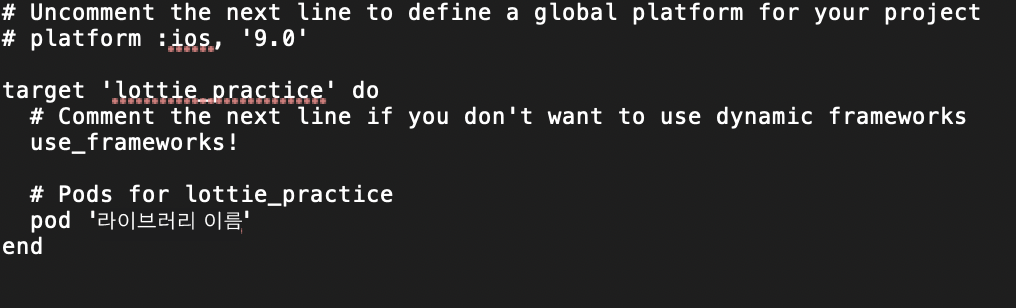
Podfile 내에 pod '설치할 라이브러리 이름' 을 입력하고 저장해 줍니다.
저장했으면, pod install 을 입력해 설치해줍니다!

이제, Podfile이 설치된 프로젝트를 이용할 수 있습니다. 파인더에서 xcworkspace 프로젝트를 통해 개발하시면 됩니다 !

끝-
'iOS > iOS 개발' 카테고리의 다른 글
| iOS - BlendShapes 활용하기 (0) | 2021.05.27 |
|---|---|
| ARKit - BlendShapes (0) | 2021.05.25 |
| iOS - Dispatch Queue (0) | 2021.05.21 |
| iOS ActionSheet 만들기 (0) | 2021.01.14 |
| iOS앱 Lottie 애니메이션 구현하기 (0) | 2020.11.29 |
- Total
- Today
- Yesterday
- Swift unowned
- 프로그래머스
- 알고리즘
- SwiftUI
- blendshape
- Swift
- UIHostingController
- cocoapods
- C++
- rxswift
- ARKit
- 코코아팟
- SWEA
- 안드로이드
- 백준온라인저지
- infallible
- rxswift6
- Kotlin
- Lottie
- disposeBag
- ios
- DispatchQueue
- coreml
- 백준
- 카카오인턴십
- Swift weak
- boj
- GraphDB
- blendshapes
- Reactivex
| 일 | 월 | 화 | 수 | 목 | 금 | 토 |
|---|---|---|---|---|---|---|
| 1 | 2 | 3 | 4 | 5 | 6 | |
| 7 | 8 | 9 | 10 | 11 | 12 | 13 |
| 14 | 15 | 16 | 17 | 18 | 19 | 20 |
| 21 | 22 | 23 | 24 | 25 | 26 | 27 |
| 28 | 29 | 30 | 31 |